Overview of the Client Portal
ClientCove is a branded client portal and the operations platform behind it — one place to run clients, projects, intake, billing, communication, files, and more, all under your own brand on your own server. The portal is what your clients log into; everything on this page is what powers it.
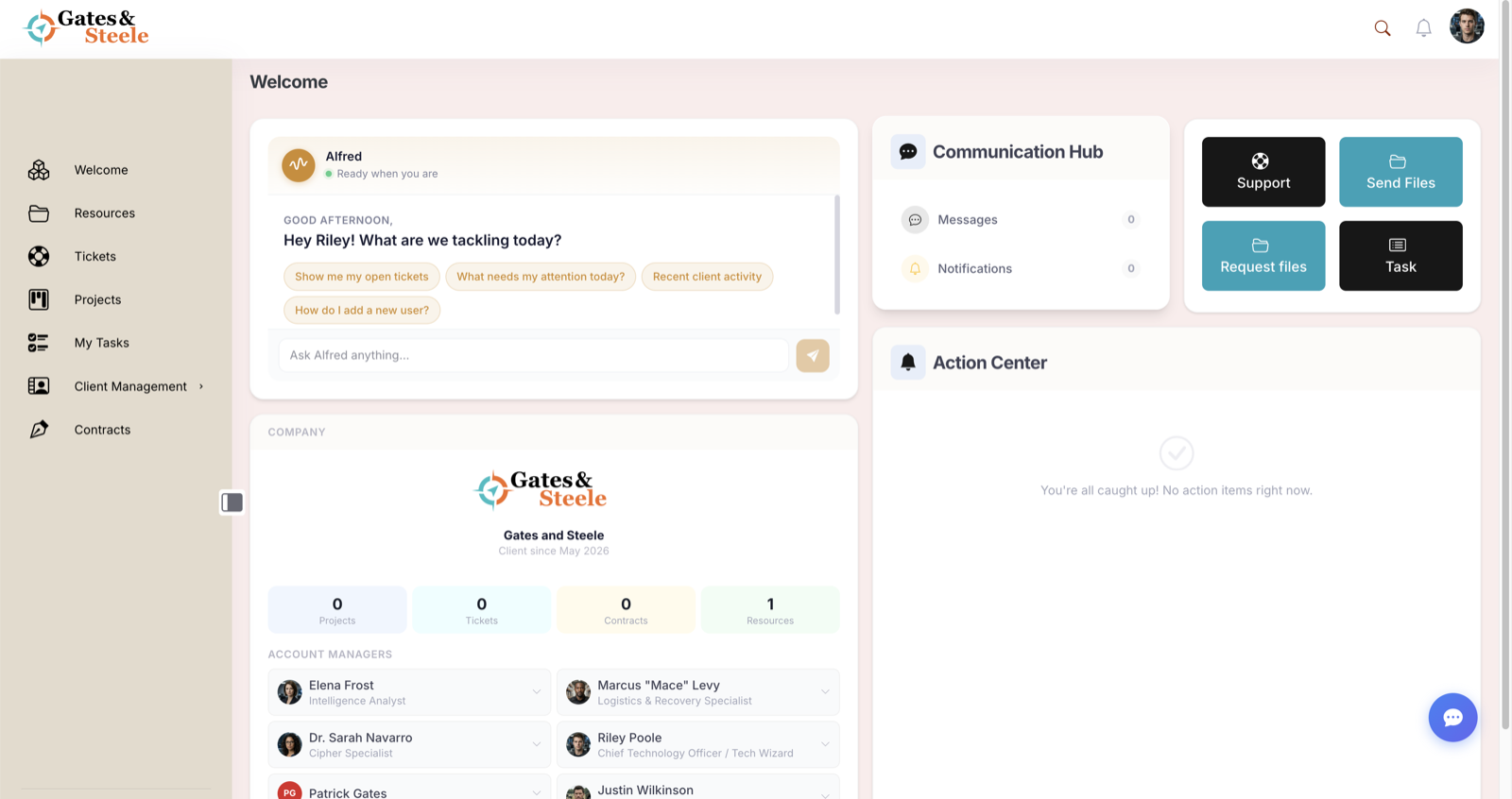
The portal dashboard — a personalized, fully branded home for every client and team member.
What ClientCove Is
Most "client portals" do one or two things. ClientCove spans the whole client lifecycle — from the first intake form to the final invoice — so you can replace a stack of disconnected tools (shared inboxes, file drives, e-sign apps, invoicing software, a separate help desk) with a single hub that looks 100% like your firm.
It's built for agencies, accountants, IT firms and MSPs, law offices, property managers, and any professional-service team that manages clients and wants everything in one organized, secure place.
What Your Clients Experience
When a client logs in, they get a clean, branded space scoped entirely to their own company — they never see another client's anything. From their dashboard they can:
- See recent activity, open tickets, shared files, and announcements at a glance
- Submit and track support tickets
- Download deliverables and shared resources
- Message your team directly
- Review and approve estimates, sign contracts, and pay invoices
- Do it all from any device — the portal is fully responsive
See How to Use Client Cove and Mobile Access for the client-side walkthrough.
Everything the Platform Does
Behind that portal is a deep operations platform. Here's the full map of what's included, grouped by what it helps you do.
Clients & people
- Client records as the hub everything links to — profiles, billing and address details, grouping, and client-to-user relationships. See Client Management.
- Roles & permissions with ownership-scoped access, so users only ever see their assigned client's content. See Permissions & Access Levels.
- User management — invite and registration flows, bulk CSV import, profiles and avatars, plus a "view as user" mode for support.
Projects, tasks & team workload
- Projects with reusable templates, a Kanban board and list views, files, and a team.
- Tasks that sync with project cards and pull in from tickets, messages, and inbound email, with time tracking.
- Crew Dashboard — a manager's view of who's carrying what across tasks, tickets, and projects.
- AI-assisted project planning to scaffold a plan from a prompt (subscription AI features).
Intake, contracts & estimates
- Intake forms — a visual form builder with conditional logic and a multi-step wizard front end for onboarding and requests. (Docs coming.)
- Contracts & e-signature — upload a PDF, place fields, send for browser-based signing with OTP verification and a tamper-evident audit trail.
- Estimates — send a quote the client can approve, decline, or request changes on, then convert it to an invoice in one click.
Billing & commerce
- Invoices — line items, branded PDF, recurring schedules, CSV import, and email delivery, with Stripe card payments built in.
- Estimates → Invoice conversion that carries every line item across.
- Products, offerings & a client-facing Marketplace — one-time and subscription products with Stripe checkout, orders, and subscription management. (Docs coming.)
Communication & support
- Secure Messaging — threaded, encrypted, portal-native conversations, with real-time delivery (subscription).
- Tickets & support — threaded responses, a public support page, and an AI ticket assistant.
- Announcements & notifications — in-app and email, with triggers, delivery preferences, and digests.
- Email Campaigns — audience segmentation, a drag-and-drop email designer, and open/click tracking.
- Knowledge Base & public support center — searchable help articles with audience gating, shared with the AI assistant. (Docs coming.)
Files, resources & deliverables
- Resources Library — files, articles, FAQs, galleries, color palettes, embedded apps, and diagrams, with version history and per-client folders.
- Cloud storage — direct-to-bucket uploads that bypass server limits, with secure share links.
- File Transfers — public send-and-request portals with branding, expiration, and limits.
Records & operations
- Locations & Assets — track client sites and equipment, with an encrypted, PIN-gated Vault for credentials and full audit logging.
- Automations — multi-step workflows that run on a schedule, on demand, or from your AI assistant.
- Decisions & Notes — lightweight tools to capture client/project decisions and quick notes. (Docs coming.)
AI & integrations
- AI features — an assistant widget, chat grounded in your docs and knowledge base, content generation, summaries, and the ticket/project assistants (subscription).
- MCP server — connect Claude and other AI clients to your portal with OAuth, so an assistant can act on clients, projects, and tickets safely.
- Integrations — Stripe, Slack, Pusher, inbound email, and embeds (Airtable, Calendly, ClickUp, and more) so clients never leave the portal.
Branding & ownership
- White-label everything — an Application Designer and Login Designer let you brand the portal and the login page as your firm, not someone else's SaaS.
- You own it — ClientCove is a licensed WordPress theme installed on your server. Your clients, your data, your rules. See the Developer Guide.
Feature availability. Some capabilities are gated by a feature toggle under Settings → Core Features (turn on only what you use), and AI, real-time messaging, and transactional email are part of your ClientCove subscription. A few areas above are noted "Docs coming" — the feature ships in the platform, with its help page on the way.
How It All Connects
The point isn't a pile of features — it's that they work as one system:
- A ticket can become a task, which you track time against and roll into an invoice — without switching tools.
- An accepted estimate converts straight to a draft invoice with the line items intact.
- A new client can trigger an intake form, a welcome email, and a contract to sign the moment they accept their invite.
- Files attach to the ticket, project, or resource they belong to, and messages can reference them.
- The dashboard, notifications, and activity log pull from every area, so there's one place to see what's happening and a record of who did what.
Built on WordPress, Owned by You
ClientCove is a WordPress theme you license and host yourself — not a SaaS you rent. That means your client data lives on infrastructure you control, you can extend the platform through the child theme and REST API, and updates flow in without you losing your customizations. Security is built in: two-factor authentication, role-based permissions, encrypted vault storage, and audit trails across the platform.
Where to Start
- New to ClientCove? Start with the Quick Start Guide.
- Setting up your portal? See Account Setup & Login and Client Management.
- Want the client's-eye view? Read How to Use Client Cove.
- Customizing or integrating? Head to the Developer Guide.